Every row, in the order you need.
Click a header to sort all rows: dates as dates, numbers as numbers, empty values last. Type in the filter box to narrow the rows. Case and accents are ignored.
 Page Properties Report & Export for Confluence
Confluence Cloud app
A macro that lists the pages with a Page Properties table: one row per page, one column per property, like Confluence’s built-in Page Properties Report. Readers can sort by any column, filter the rows, and download them as Excel or CSV. Editors choose the column order, names, and widths.
Free for Confluence sites with up to 10 users.
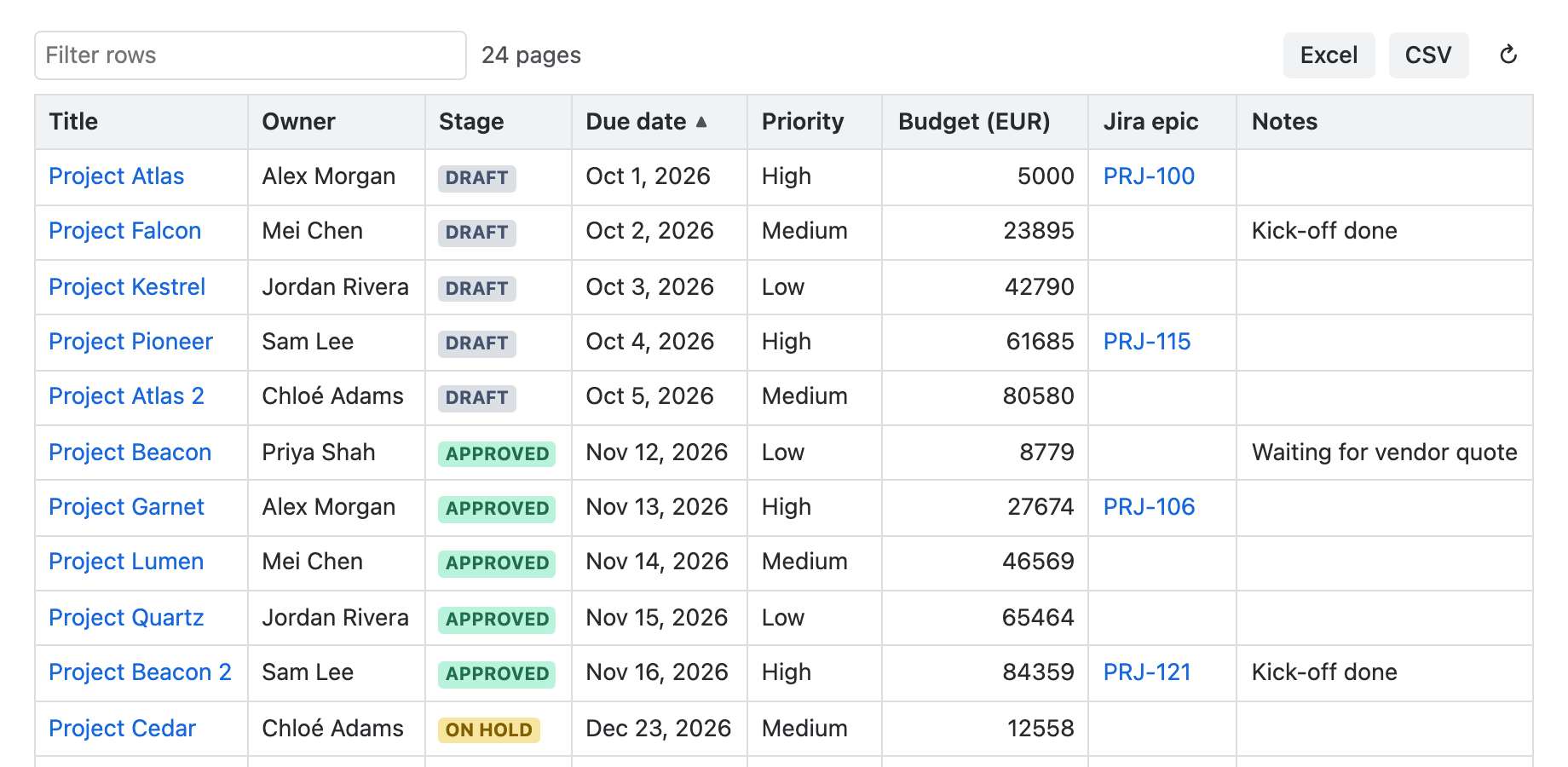
Click a header to sort all rows: dates as dates, numbers as numbers, empty values last. Type in the filter box to narrow the rows. Case and accents are ignored.
Reorder, rename, resize, and hide columns. Save up to two sort levels and filters such as “Status is Done”, so every reader starts from the same view.
Readers download the filtered rows as Excel or CSV, with a link to each page. Status lozenges, dates, mentions, and Jira links become readable values.
A Confluence administrator installs the app once from Atlassian Marketplace. Each reader sees only the pages they are allowed to read. The user guide explains every setting.
Confluence’s built-in Page Properties Report collects page properties into one table. These are its best-known gaps; most are open issues in Atlassian’s public tracker:
The report is built in the reader’s browser. The app calls Confluence as that reader, so everyone sees only the pages they are allowed to read. Settings are saved in the macro on the page. There is no vendor backend, no external calls, no app data storage, and no analytics.
See security and the privacy notice for details.
The report reads published versions. Other macros inside property values are shown as their text. New pages appear after Confluence’s search has indexed them.
Yes. Click a column header to sort all rows by it, and click again to reverse. Dates sort as dates, numbers as numbers, and text in natural order, so “Item 2” comes before “Item 10”. Empty values stay at the bottom. Editors can also save a default sort with up to two levels.
Yes. Type in the filter box to show only the rows that contain your words. It ignores case and accents, so “chloe” finds “Chloé”. Editors can also save filters: contains, does not contain, is, is not, is empty, and is not empty.
Yes. Editors set a width in pixels for each column. They can also reorder, rename, and hide columns.
Choose Excel or CSV above the report. The file has the rows that match the current filter, in the current order, with the visible columns and an added Page link column. In languages that write decimals with a comma, the CSV uses semicolons and decimal commas.
A page is listed when it has a Page Properties macro, matches the report’s settings, and you are allowed to read it. New pages appear after Confluence’s search has indexed them, as with the built-in report. A report stops at its page limit: 1,000 pages by default, up to 5,000.
Yes. When the page already has Confluence’s built-in Page Properties Report, the settings offer Copy its settings. One click copies its CQL, columns, sort, page size, first-column name, and ID.
Yes. When someone exports the page to PDF or Word from Confluence, the report is included as a table, sorted and filtered as saved in its settings, with up to 500 pages.
English, German, French, Spanish, Italian, Portuguese (Brazil), Dutch, Polish, Japanese, and Czech. It follows each user’s Confluence language.
No. It is a Forge app for Confluence Cloud.
No. The report is built in the reader’s browser from Confluence’s REST API, with that reader’s permissions. For PDF and Word exports, an Atlassian-hosted Forge function does the same read as the exporting user and stores nothing. There is no vendor backend, no external calls, no app data storage, and no analytics.
It is free for Confluence sites with up to 10 users. Larger sites pay through Atlassian Marketplace.