Confluence Cloud guide
How to export a Confluence table to Excel
In short: Confluence Cloud has no button that exports one table to Excel. Copy the table and paste it into Excel, or export the page to Word or PDF and take the table from there. Then check what Excel changed: it drops leading zeros, keeps only 15 digits of long numbers, turns date-like text into dates, and can split cells with several lines into several rows. Each problem has a fix below.
Copy and paste the table
- Open the published page in Confluence.
- Drag across the table from the top-left cell to the bottom-right cell, and copy it (Ctrl+C on Windows, Cmd+C on Mac).
- In Excel, click cell A1 and paste (Ctrl+V or Cmd+V).
- Compare the result with the page: the header row, the number of rows, IDs or codes with leading zeros, long numbers, dates, and cells with more than one line.
This is the quickest way for one small table. Step 4 matters because Excel's automatic data conversions apply when you enter, paste or load text, so pasted values are converted just like typed ones (Microsoft). The fixes are below.
Export the page to Word, then copy the table
- On the page, select ••• → Export → Export to Word.
- Open the file in Microsoft Word. Atlassian notes that the exported file opens only in Word, not in Google Docs, LibreOffice or OpenOffice.
- Select the table in Word, copy it and paste it into Excel.
The Word file holds the whole page, so this helps when a page has several tables. Only the published version is exported, so publish your edits first. The CONFCLOUD-39212 request says this route can leave duplicated lines and extra rows in Excel, so check the result.
Export to PDF and import it into Excel
- On the page, select ••• → Export → Export to PDF.
- In Excel, choose Data → Get Data → From File → From PDF, pick the file and select Open.
- In the Navigator, select the table, then Load. Or select Transform Data to clean it up first.
Excel's PDF connector needs the .NET Framework 4.5 or later on your computer. A PDF page is narrower than your screen, and table rows can't wrap, so Atlassian warns that wide tables may be cut off. Its suggestions: make images in the table smaller, swap rows and columns so the table grows taller instead of wider, or print to PDF in landscape from your browser.
Jira lists, databases and reports
- A table of Jira work items on a Confluence page comes from Jira. Run the same search in Jira, then select ••• → Export → Export Excel CSV (all fields or current fields). Jira also has an Open in Microsoft Excel option above the search results.
- A Confluence database isn't a page table, and it has its own export: ••• → Export, then CSV, HTML or PDF.
- A Content Properties Report (formerly the Page Properties Report) is built by a macro, and Atlassian's help page for it describes no export. We also make Page Properties Report & Export, a macro that builds this kind of report and downloads its rows as Excel or CSV.
What goes wrong in Excel, and how to fix it
Most problems come from Excel guessing what each cell holds. Some fixes have to happen before you paste, because digits Excel has already dropped don't come back.
| Problem | Example | Fix |
|---|---|---|
| Leading zeros disappear | 007 becomes 7. | Excel removes leading zeros from numbers. In Excel for Microsoft 365 or Excel 2024, turn off "Remove leading zeros and convert to a number" before you paste. For a single value, type an apostrophe first: '007. |
| Long numbers change | A 16-digit ID shows as 1.23E+15, and digits after the 15th turn into zeros. | Excel keeps 15 significant digits. Turn off "Keep first 15 digits of long numbers and display in scientific notation" before you paste, so the numbers are stored as text. Formatting the column as Text afterward doesn't bring the digits back, so change the setting and paste again. |
| Text turns into dates | 12/2 becomes 2-Dec. | Excel converts date-like entries. Format the cells as Text before you type, or start the value with an apostrophe. The conversion setting only stops values with letters and digits run together, such as JAN1. For a whole pasted column, bring it in through a CSV and import that column as Text. |
| Merged cells block sorting | A heading spans two columns. | Excel won't sort a range whose merged cells differ in size ("This operation requires the merged cells to be identically sized"). Select the range, open the Alignment settings on the Home tab, clear Merge cells, then fill in the empty cells. |
| One cell becomes several rows | A cell with three lines turns into three rows. | For a few cells, double-click the target cell (or press F2) and paste into it. For many, paste the table into Word, replace the line breaks with a rare character such as ~, paste into Excel, then replace ~ again. |
| Links | You need the web address, not just the link text. | Check a few links after pasting. If the addresses are missing, copy the ones you need from the page. |
| Several tables on one page | A page with four tables. | Copy each table on its own, or export the page to Word, which holds all of them. |
Where to turn off the conversions: File → Options → Data → Automatic Data Conversion on Windows, Excel → Preferences → Edit → Automatic Data Conversion on Mac. The settings exist in Excel for Microsoft 365 and Excel 2024.
Export it with our app
We make Export Tables to Excel & CSV for Confluence, so this part describes our own product. It adds an export to the page menu in Confluence Cloud:
- Open the published page or blog post.
- Choose ••• → Apps → Export Tables to Excel & CSV. The dialog lists every table on the page with a short preview.
- Choose Download all as Excel for one workbook with a worksheet per table, or use a table's Excel, CSV or Copy button.
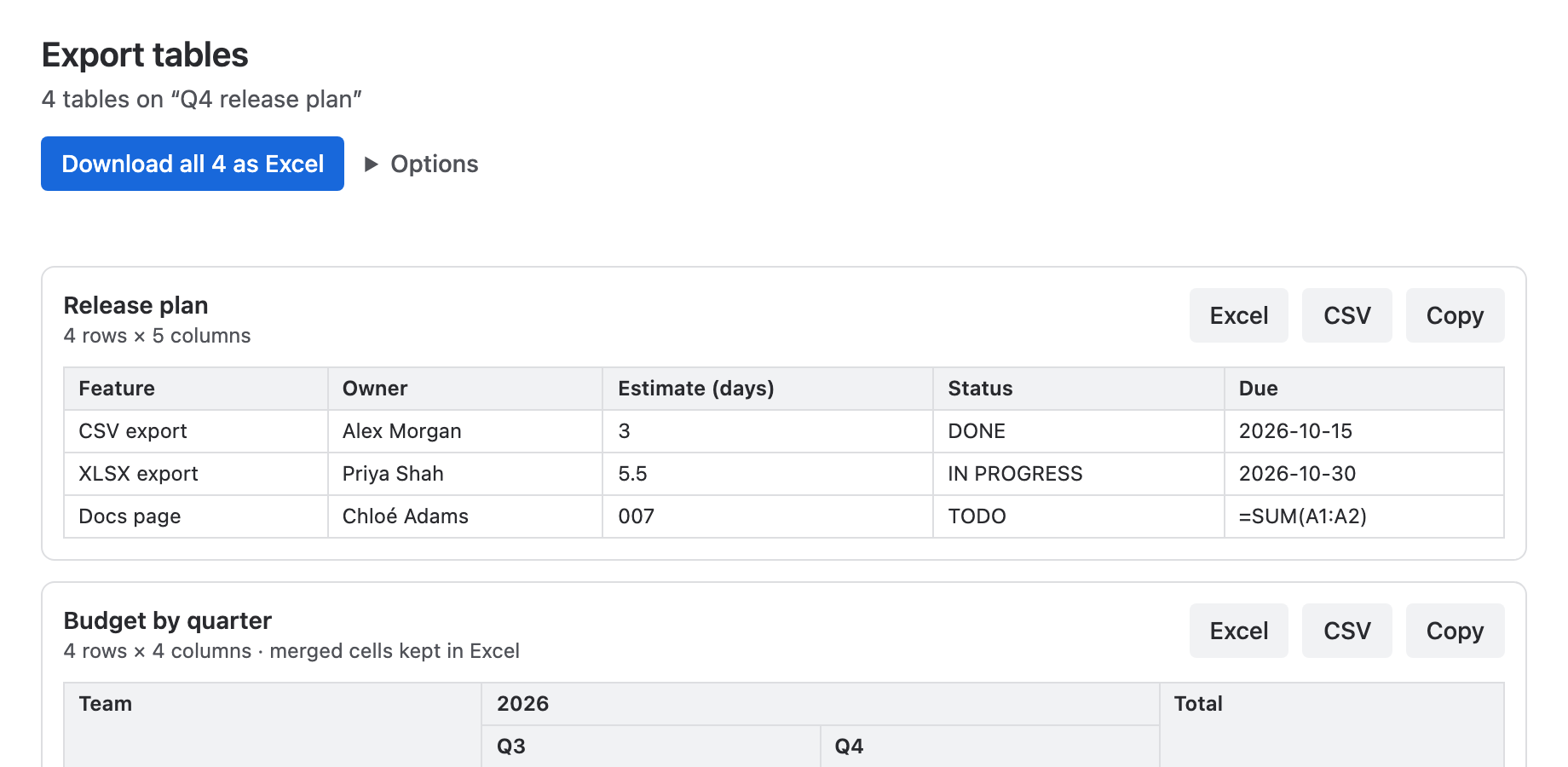
The Excel download stores IDs like 007, long numbers and text that looks like a date or a formula as text, so they stay as written. Plain numbers such as 42 or -3.5 stay numbers you can sum. Merged cells stay merged, header rows are bold and frozen, and cells with several lines wrap. Worksheets are named from nearby headings or expand titles.
What it doesn't do: it reads the last published version of the page, and it skips tables generated by macros, such as Jira lists and the Content Properties Report. Dates export as ISO text (2026-11-17), not as Excel date cells. Links export as their visible text, and cell colors aren't kept. It works in Confluence Cloud only. A Confluence admin installs it once, and it's free for sites with up to 10 users. The user guide explains the options.
Frequently asked questions
Can I export a Confluence table to Excel without an app?
Yes, but not with one click. Copy and paste the table into Excel, or export the page to Word or PDF and take the table from that file. Confluence Cloud has no built-in option that saves one table as an Excel file.
Why does Excel remove the leading zeros from my Confluence table?
Excel treats values like 007 as numbers and drops the zeros. In Excel for Microsoft 365 or Excel 2024, turn off "Remove leading zeros and convert to a number" under Automatic Data Conversion before you paste, or type an apostrophe before a value to keep it as text.
How do I export all tables on a Confluence page at once?
Export the page to Word: the file contains every table on the page. With our app, Download all as Excel puts each table on its own worksheet in one workbook.
Why are my latest changes missing from the export?
Confluence's Word and PDF exports include only the published version of a page. Publish your changes, then export again.
Does this work in Confluence Data Center?
This guide covers Confluence Cloud. Our app is for Confluence Cloud only.
Read next
Sources
- CONFCLOUD-39212: As an Admin I'd like to export Confluence tables to excel — Atlassian feature request, created 2015, status Gathering Interest (checked November 17, 2026)
- Export a space's content as Word, PDF, or data files — Atlassian Support, Confluence Cloud: page export to Word and PDF, space export to CSV
- Wide tables may be cut off in PDF export — Atlassian Support, Confluence Cloud
- Import data from data sources (Power Query) — Microsoft Support: From PDF, and its .NET Framework requirement
- Export search results — Atlassian Support, Jira Cloud: Export Excel CSV and Open in Microsoft Excel
- Export your database data — Atlassian Support, Confluence Cloud databases: CSV, HTML and PDF
- Insert the content properties report macro — Atlassian Support, Confluence Cloud: formerly the page properties report macro
- Data import and analysis options in Excel — Microsoft Support: Automatic data conversion when entering, pasting or loading text
- Control data conversions in Excel for Windows and Mac — Microsoft 365 Insider blog, August 25, 2024: menu paths on Windows and Mac
- Keeping leading zeros and large numbers — Microsoft Support: leading zeros, 15-digit precision, importing columns as Text
- Stop automatically changing numbers to dates — Microsoft Support
- An error message when you sort a range that contains merged cells in Excel — Microsoft Learn troubleshooting article
- Excel Breaking Cell Value into Multiple Rows — Microsoft Q&A thread, September 2020 (community answers, not official documentation)