Bulk updates for everyone.
Jira’s CSV import can update existing issues only for administrators. Here anyone who can edit the issues can update them from a spreadsheet.
 Edit Issues in Excel for Jira
Jira Cloud app
Update existing Jira issues from a spreadsheet without admin rights. Export a search to a workbook, edit it in Excel, and upload it again. You review every change, and every conflict with edits made in Jira meanwhile, before it is applied as you, with your Jira permissions.
Free for Jira sites with up to 10 users.
Jira’s CSV import can update existing issues only for administrators. Here anyone who can edit the issues can update them from a spreadsheet.
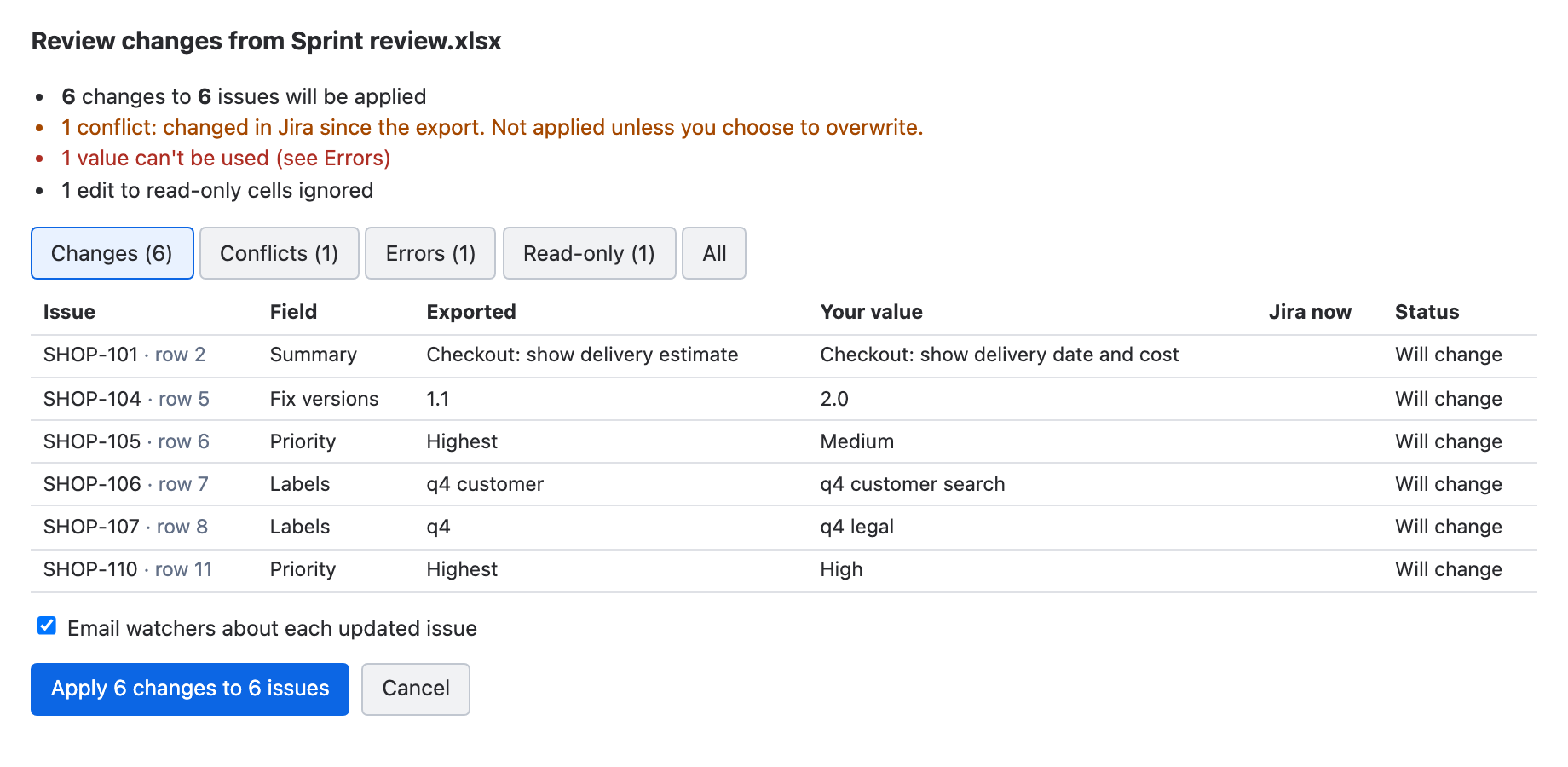
Each cell is compared with the exported value and with Jira now. If someone changed an issue while you worked, you see a conflict and decide.
Dropdowns list the allowed values, read-only cells are grey, dates are real dates. Upload the file as it is; there are no columns to map.
A Jira administrator installs the app once from Atlassian Marketplace. After that, anyone who can edit the issues can use it. Uploading the same workbook again is safe: changes already in Jira are recognised and skipped. The user guide walks through each step.
Jira’s CSV import can update existing issues only for Jira administrators. Everyone else gets the Bulk Create wizard, which creates new issues and has no Issue Key mapping, so it cannot change the issues you already have. Without it, the edits go back by hand: copy each value from the spreadsheet into Jira, one issue at a time.
With Edit Issues in Excel, anyone who can edit the issues updates them from the workbook, and Jira checks every change against that person’s permissions. There are no columns to map. Each cell is compared with the exported value and with Jira now, so a colleague’s newer edit shows up as a conflict instead of being overwritten. Changes appear in each issue’s history under your name, and a report lists every result.
The app reads and updates Jira using your existing permissions and builds the workbook in your browser. It has no vendor backend, external API calls, or app data store.
See security and the privacy notice for details.
Status, date-time fields, sprint, and parent stay read-only, like descriptions with rich formatting. New rows are skipped, and deleting a row never deletes an issue.
Yes. Jira’s CSV import updates existing issues only for administrators, but this app works for anyone who can edit the issues. Jira’s permissions decide what each person can change.
The review compares each cell with the exported value and with Jira now. A value someone changed in Jira after your export is shown as a conflict and is kept unless you tick Overwrite.
Summary, description, environment, priority, labels, components, fix versions, affects versions, assignee, reporter, due date, and custom fields of these types: text, paragraph, URL, number, story points, date, select list, radio buttons, multi-select, checkboxes, user picker, labels, and multiple-version picker. Status, date-time fields, sprint, and parent can be exported for reference but stay read-only.
No. The app updates existing issues from the export. New rows are skipped, and deleting a row does not delete the issue.
Up to 5,000 issues per export; narrow the search to export more. Jira requires a restricted search, for example one that names a project.
Excel, LibreOffice, and Numbers. Numbers keeps the data but drops the dropdowns and frozen header when it saves.
Yes, Jira emails watchers as usual. Jira and project administrators can switch that off before applying.
No. The app reads and updates Jira with your permissions and builds the workbook in your browser. It has no vendor backend, external API calls, app data store, or third-party analytics.
No. Edit Issues in Excel is a Forge app for Jira Cloud.
It is free for Jira sites with up to 10 users. Larger sites subscribe per user through Atlassian Marketplace, which also offers a free trial.