Confluence Cloud guide
How to sort a Confluence Page Properties Report
In short: Edit the report and type a column name in Sort by, exactly as it is written in the Page Properties tables. Tick Reverse Sort to reverse the order. That sorts all results. Clicking a column header on the published page sorts only the rows on screen, 30 at most. Without a Sort by, the report is sorted by Modified. There is one sort level and no Created column to sort by.
Set the order with Sort by
- Edit the page with the report, select the report and open its settings.
- In Sort by, type the name of a column exactly as it appears in the Page Properties tables, for example
Due date. - Tick Reverse Sort if you want the order turned around, for example Z to A.
- Save and publish the page.
If you leave Sort by empty, the report is sorted by Modified, the default. In December 2024 Atlassian said it had fixed a bug where Sort by sorted only the first page of results, so it now sorts all of them (Atlassian's comment on CONFCLOUD-78373).
Why clicking a column header doesn't sort everything
On the published page you can click a column header to sort, but only the rows on screen move. The report shows at most 30 rows at a time (Max results per page is 30 by default and 30 at most), and a header click sorts just those rows. The rows on the report's next pages stay where they were.
Atlassian calls this "consistent with the macro's original design" and treats sorting across all pages as a suggestion for the future (CONFCLOUD-78373). The same request, CONFCLOUD-32571, has been open since 2014.
So when a report has more than 30 rows, a header click can show the wrong row at the top. Use Sort by for the order everyone should see.
What the built-in report can't sort
- Two columns at once. There is one Sort by field, so there is no "by status, then by due date".
- Creation date. The report has no Created column to show or sort by. CONFCLOUD-84946 asks for one, and CONFCLOUD-32332 asks to sort by creation date.
- Likes or comments. Show Likes Count and Show Comments Count add those numbers as columns, but sorting by them is an open suggestion (CONFCLOUD-32534).
- Every row with a click, as explained above.
Workarounds
- Pick the most useful order for Sort by. It is the only order that covers every row, so choose the one readers need most, such as the due date.
- Keep each report under 30 rows. Narrow it with a second label, a parent page or a space, or split it into several reports, such as one per status label. Then a header click sorts everything in that report.
- Add the value you want to sort by as a property. For a creation date or a priority number, add a property such as
CreatedorPriorityto the Page Properties tables, and name it in Sort by.
Sorting with our app
We make Page Properties Report & Export for Confluence, so this part describes our own product.
- A click on any header sorts every row in the report, not just the rows on screen. A second click reverses the order. A reader's click changes only their own view.
- Editors save a default sort with up to two levels, such as Stage, then Due date, each ascending or descending.
- Dates sort as dates, numbers as numbers, and text in natural order, so "Item 2" comes before "Item 10". Empty values stay at the bottom.
- Created and Last updated can be shown as columns, so you can sort by them too.
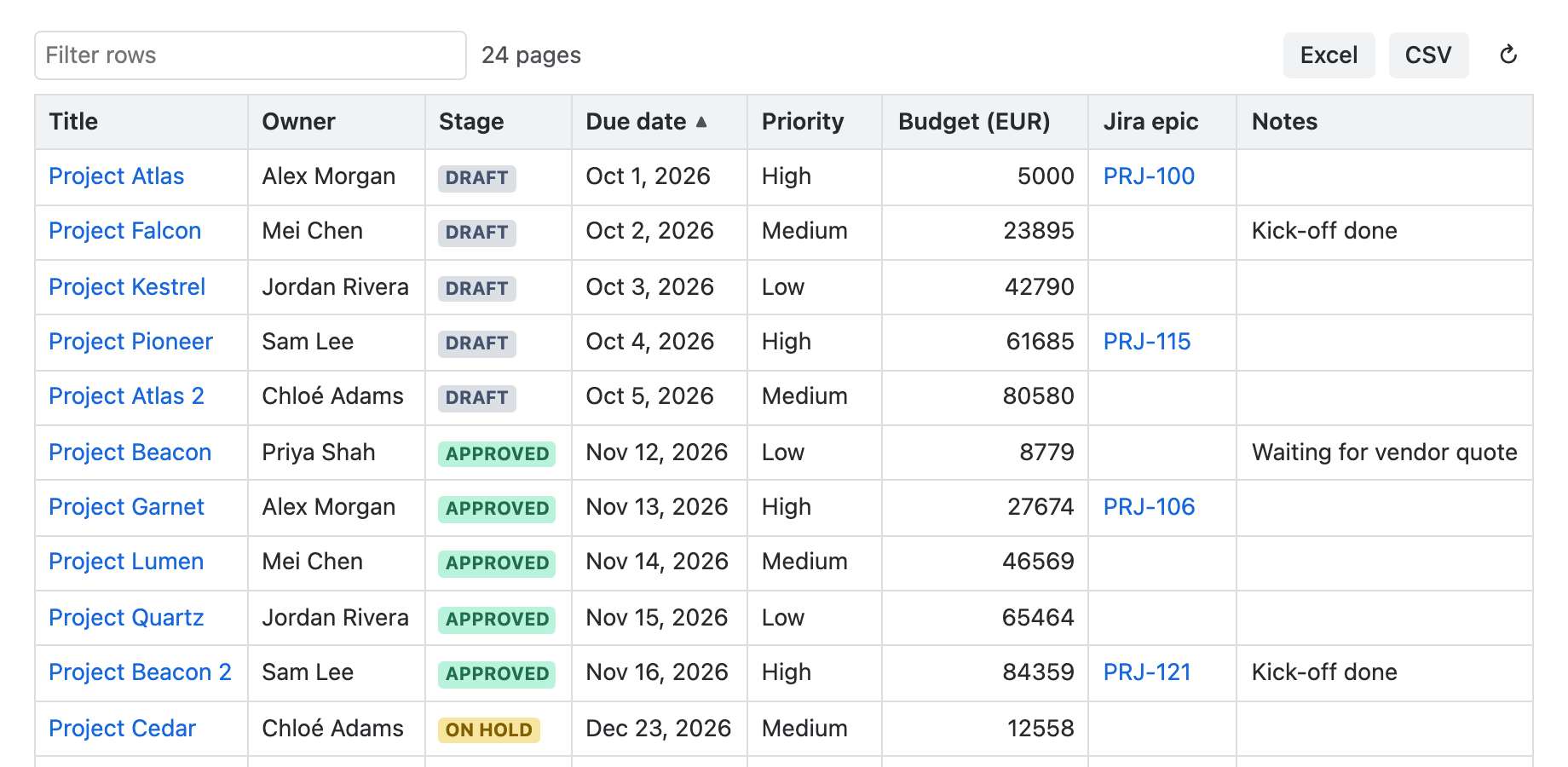
The sort settings are explained in the user guide.
Frequently asked questions
How do I sort a Page Properties Report by a column?
Edit the report and type the column name in Sort by, exactly as it is written in the Page Properties tables. Then save and publish the page.
How do I reverse the sort order?
Tick Reverse Sort in the report's settings, then save and publish the page.
Why does clicking a column header sort only some rows?
The built-in report shows at most 30 rows at a time, and a header click sorts only the rows on screen. Atlassian treats sorting across all pages as a suggestion (CONFCLOUD-78373). Sort by in the settings sorts all results.
Can I sort a Page Properties Report by two columns?
Not in the built-in report: it has one Sort by field. Our app saves up to two sort levels.
What is the default sort order?
Atlassian's documentation gives Modified as the default for Sort by.
Read next
Sources
- Insert the content properties report macro — Atlassian Support, Confluence Cloud: Sort by, Reverse Sort, Max results per page
- CONFCLOUD-78373: Clicking on column name does not sort across all pages in Page properties report macro — Bug, gathering impact; Atlassian's comment of December 9, 2024 on Sort by and header clicks
- CONFCLOUD-32571: Page Properties Report does not sort across all available pages — Suggestion, gathering interest
- CONFCLOUD-78762: Page properties Report max results per page increase — Suggestion, gathering interest
- CONFCLOUD-84946: Provide built-in "Date Created" display column option within Content Properties Report config — Suggestion, gathering interest
- CONFCLOUD-32332: Make Page Properties Report able to be sorted by page variables — Suggestion: sort by creation date
- CONFCLOUD-32534: Page properties report: sort by number of likes or comments — Suggestion, gathering interest